The method
How I use Claude Code and Claude Science
Two tools with two jobs. Claude Code was the engineer and the orchestrator. Claude Science was the independent reviewer and the live workbench. The point was to use them for things a single assistant writing code cannot do.
Claude Code
Claude Code is the tool I know best, so it did the building: the initial analysis, the scoring pipeline, and training the supervised model on AWS SageMaker from the command line. As a bioinformatician the appeal is control. I can read every line it generates and pick the framework I want for each job, whether nf-core, SageMaker, or Podman, rather than accept a black box.
Claude Code did more than write scripts. It built and verified the analysis, and ran multi-agent review as a first-class step of the research.
- It built and verified the pipeline. Fetch and freeze the ground truth at a pinned commit, reconstruct each element's reference and validate it against GRCh38 before any prediction, run the oracle in-silico mutagenesis, score against the measured maps with a permutation null, and annotate the top predictions against a clinical database. Every number in the report is bound to a committed table.
- It ran a five-reviewer peer review. The finished report was sent to five expert reviewers, a regulatory-genomics expert, a statistician, a clinical geneticist, a reproducibility auditor, and an editor, each auditing it against the actual code. The editor recomputed the contested statistic and found the correct version was stronger, not weaker. Every fix was applied.
The clearest example: the reviewers disagreed about whether the clinical-recovery test would survive a stricter null. Rather than take a side, the editor agent re-ran it and reported that the p-value improved from 0.0026 to 0.0010. The revision made the paper more correct and more conservative at once.
Persistent context across sessions
A hackathon runs over several days, and a session can stop at any point. Two plain files kept the work continuous and kept the assistant on method rather than letting it drift.
The first is the CLAUDE.md file, read at the start of every session. It is global, the same across projects: the preferences and guardrails that do not change, so every session starts aligned without me repeating myself.
# Prose Writing Preferences
When writing prose:
- Avoid using hyphens.
- Avoid using em dashes.
- Prefer writing short sentences.
- Avoid parenthetical asides.

# General Behavior
- Always ask clarifying questions before starting a task. Do not make assumptions and proceed.
- When the task involves building an application, create a PRD (Product Requirements Document) together with the user before writing any code.

# Programming Language Preferences
- Preferred languages: Python, R, Rust.
- For Python, use Google-style docstrings for all functions and classes (compatible with Sphinx/Napoleon).

# Python Environment Rules
- NEVER use `pip install`, `pip3 install`, or `python -m pip install` directly.
- Always use `uv` for Python dependency management.
- When adding dependencies, use `uv add <package>` (updates `pyproject.toml` automatically).
- When running Python scripts, prefer `uv run python ...` to ensure the correct virtual environment.
- Never install packages into the system or global Python environment.
- If a project lacks a `pyproject.toml`, create one with `uv init` before adding dependencies.
- If `uv` is not available in the environment, stop and ask the user how to proceed.

# Containers & Environments
- For R projects, always use a container to run the code unless instructed otherwise.
- If a project has a `Dockerfile` or `docker-compose.yml`, use Podman rather than Docker (e.g. `podman build`, `podman run`, `podman-compose`).

# Code Execution
- Save code in a script before running it. Do not run inline code snippets.

# ML
- Never apply SMOTE or equivalent oversampling strategies without explicit user approval. Raise the tradeoff discussion first, as these strategies have not been shown to be optimal.

# Sudo Rules
- NEVER run `sudo` commands directly — they will fail.
- Always prefer non-sudo alternatives first (user-level installs, `uv`, `flatpak --user`, Podman rootless, etc.).
- Only when there is truly no non-sudo alternative, print the `sudo` command for the user to run manually.

# Git Commit Rules
- Use Conventional Commits style for all commit messages (e.g. `feat:`, `fix:`, `chore:`, `docs:`, `refactor:`, `test:`).
- Commit changes regularly after each logical unit of work. Do not let large batches of changes accumulate uncommitted.
- NEVER push hardcoded secrets or API keys. Always read credentials from environment variables or a secrets manager.

# Output & File Conventions
- Use snake_case for all output file names.
- Append a timestamp to output file names where relevant (e.g. `report_2025_04_11.csv`).

# Kaggle API
- Refer to a local Kaggle authentication doc, configured per machine. If it is not present, ask for the correct location before proceeding.
The second is a session summary, a living operating document, one per project, that Claude Code updated as it worked and read at the start of the next session. Some parts were pinned, like the deadline and the working rules. Some were overwritten each session, like the current state. And some were append-only, so nothing was lost if a session stopped mid-run. The layout, with how each part was maintained:
# Session summary            a living file, updated as work proceeds

## The schedule       the hard deadline, pinned
## Resume now         current state + next step, overwritten each session
## Working rules      how we work, pinned; changed only when a rule truly changes
## Do not redo        dead ends already paid for, append-only, never deleted
## Decisions          durable choices, one tight bullet each
## Next               the next task in full, with its files and a "done when"
## Worklog            one line per commit, append-only, in time order
## Journal            one dated entry per session, newest first
Two parts carried most of the weight. The working rules were the method itself, a numbered list kept pinned across sessions and enforced by default rather than from memory. Most of them are the guardrails that protect a scientific result:
## Working rules   (pinned; the method, enforced by default)

#0   Ship a finding a reviewer can trust, and that is nice to watch.
#0A  Commit each logical unit as you go, never batched to the end.
#0B  Append one worklog line immediately after every commit.
#1   Work like a scientist: read the field, implement, review, then report.
#2   Assert nothing you have not checked against a control that could fail.
#3   Never filter, tune, or select on the held-out set; a leak there is fatal.
#4   Never add a positive after watching it rank; the criterion is fixed in advance.
#5   Scripts write the committed tables; the report only reads and draws them.
#5A  The report is a peer-reviewed paper: IMRaD, measured prose, numbers tied to tables.
#6   Claim discipline: own a reproduction as trust, not a discovery; hedge to the evidence.
#7   One tool builds, another verifies independently; log every handoff and disagreement.
#8   Write the plan before the code; fix the environment and style conventions up front.
#9   Set a go/no-go gate and a real fallback, and honor them, even against sunk cost.
The worklog was the second: an append-only audit trail, one line per commit, so that if a session died mid-run the record of what had been done survived it. A slice:
## Worklog   (append-only, one line per commit)

2026-07-09  N1  freeze the ground truth              ->  done, tree clean
2026-07-09  N2  extract reference sequences + SNVs   ->  39,170 SNVs
2026-07-10  N4  score vs measured, permutation null  ->  gate passed, +0.53
Together, a global file for how I work and a per-project file for where the work stands, they kept a multi-day project coherent across every session and every interruption.
Claude Science
Where Claude Code built the work, Claude Science checked it. It is a browser research workbench with literature access, official data connectors, and its own compute. I used it to peer review and independently verify the findings in the Quarto report, from the outside and against numbers already committed to git, so that agreement means something.
In its own workbench
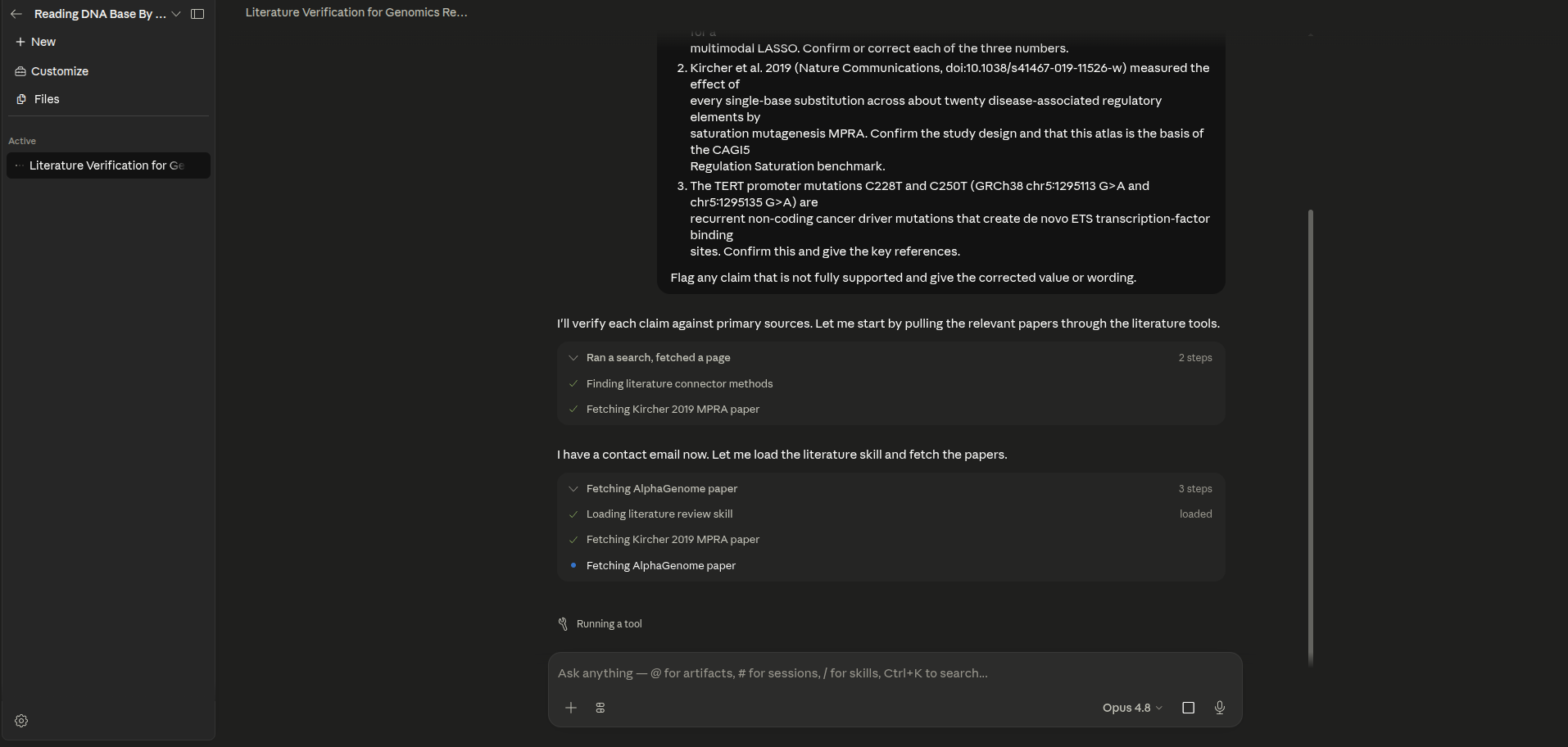
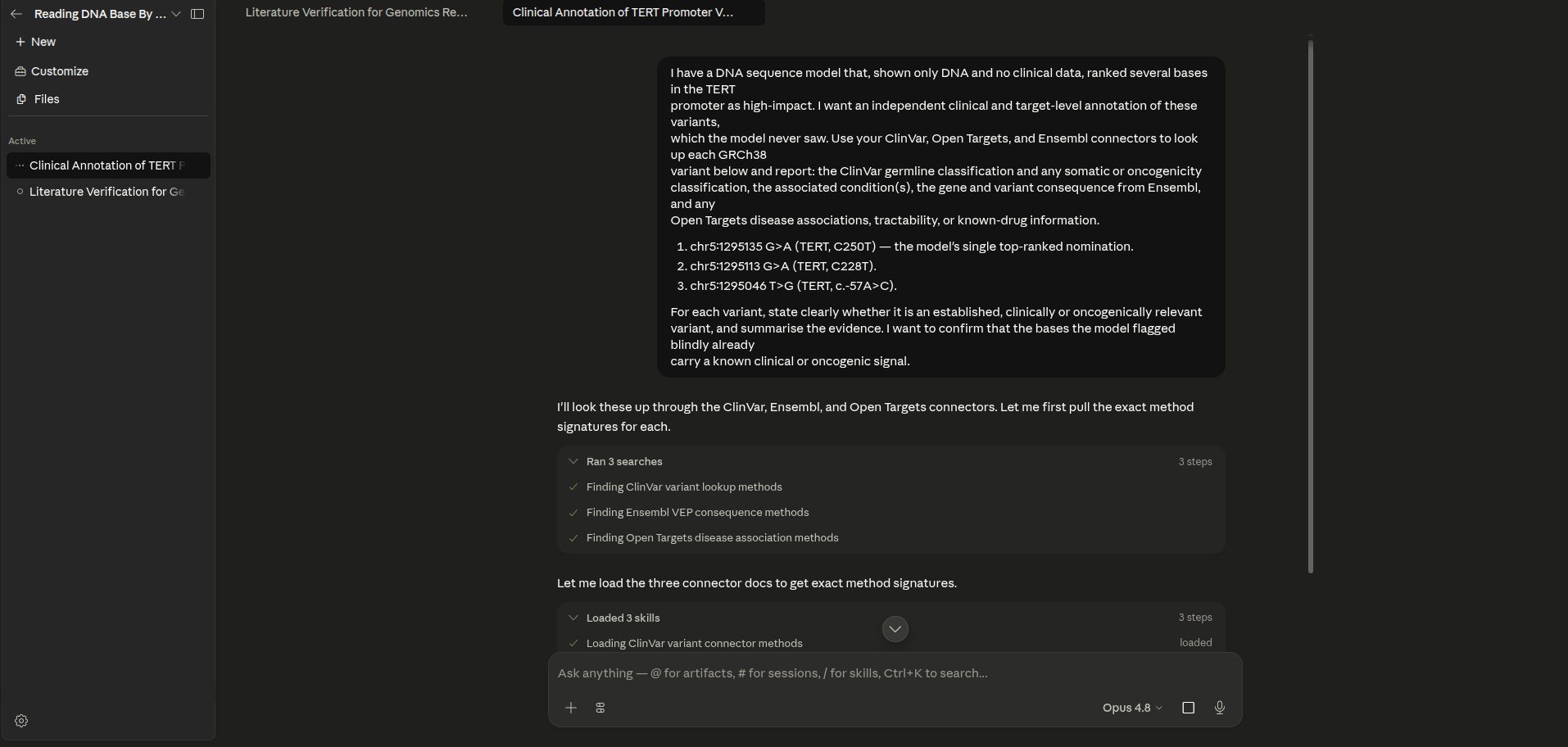
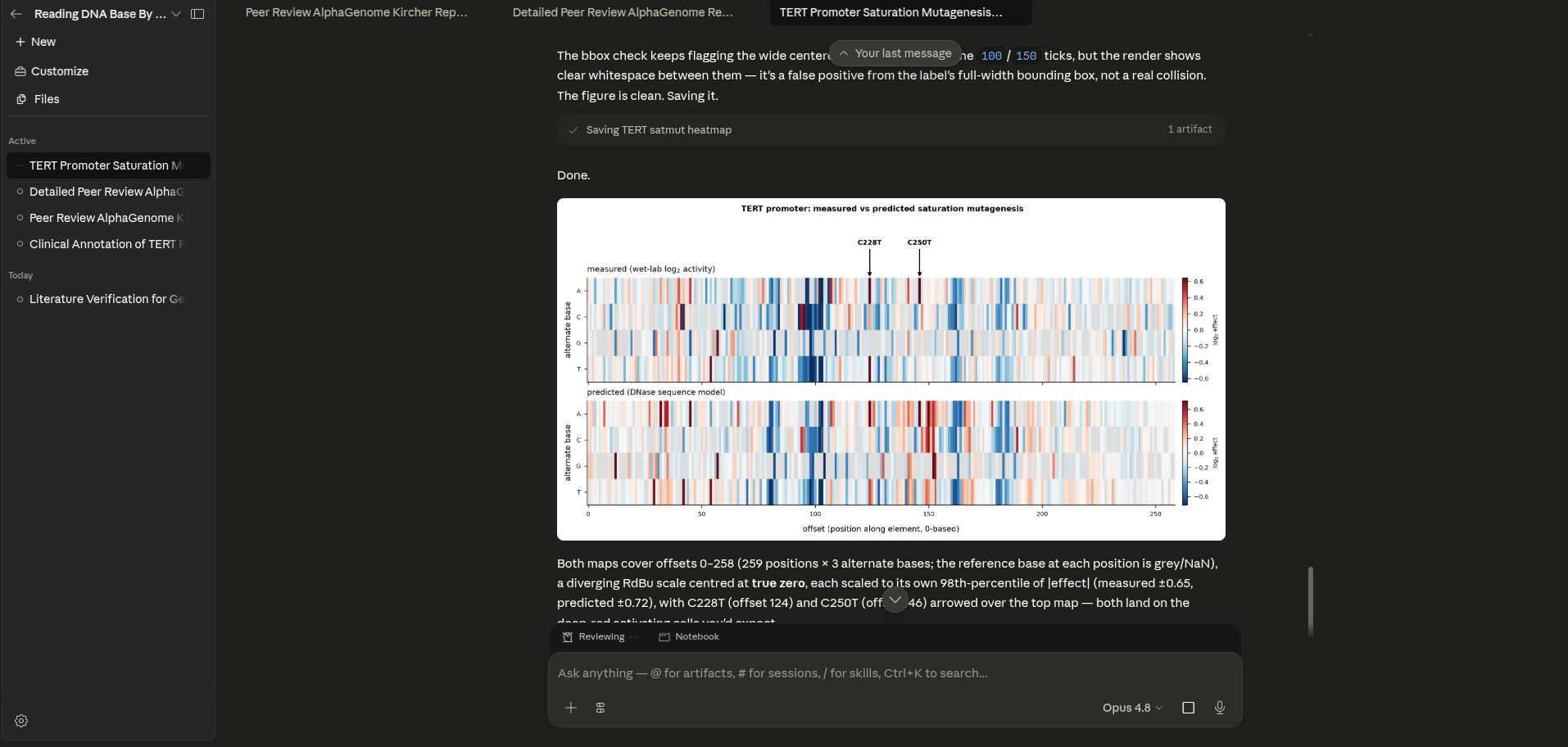
Three of the sessions, end to end: verifying the published benchmark numbers against the primary literature, annotating the flagged variants live through the clinical connectors, and reproducing a figure from the committed tables.
The figures it reproduced
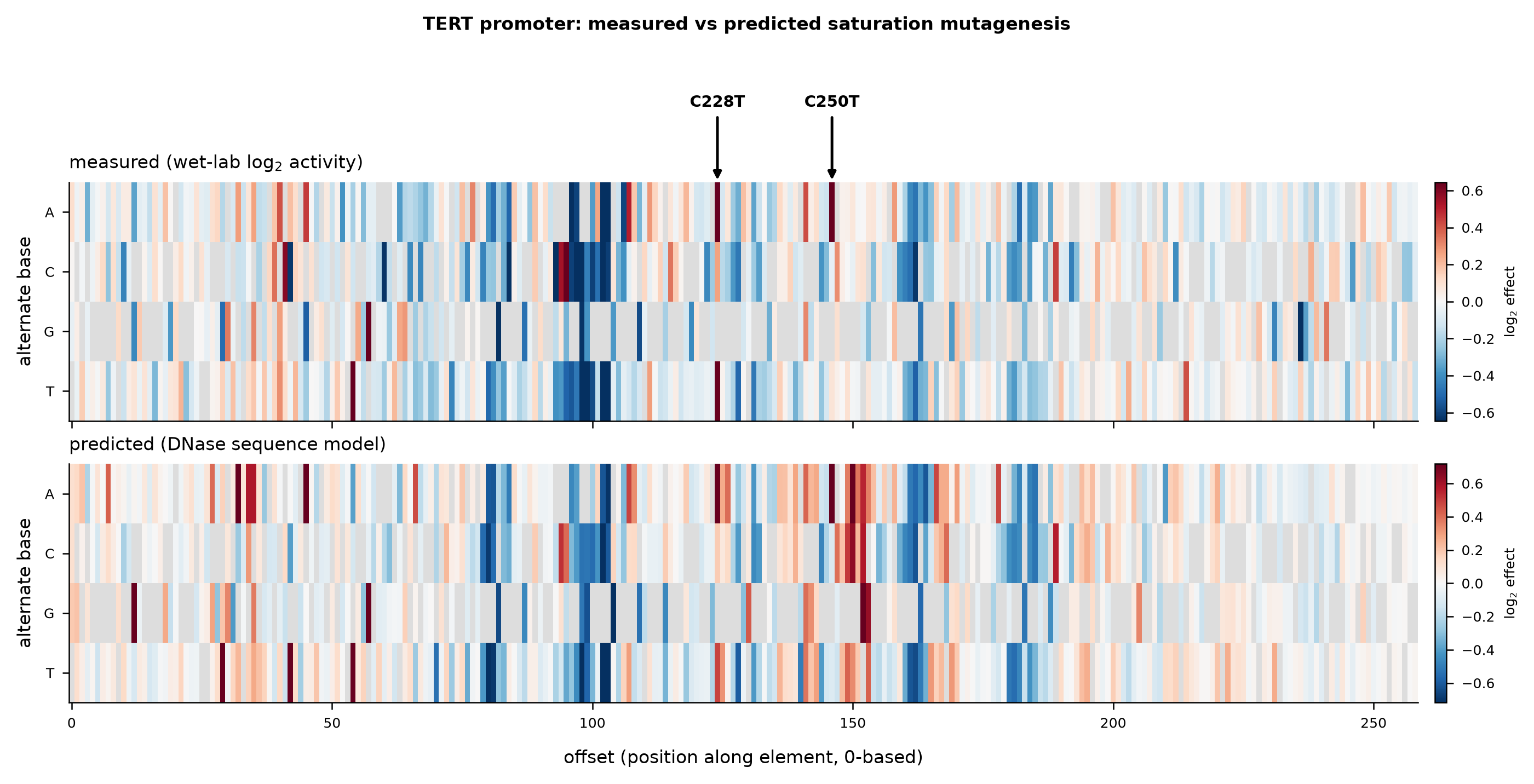
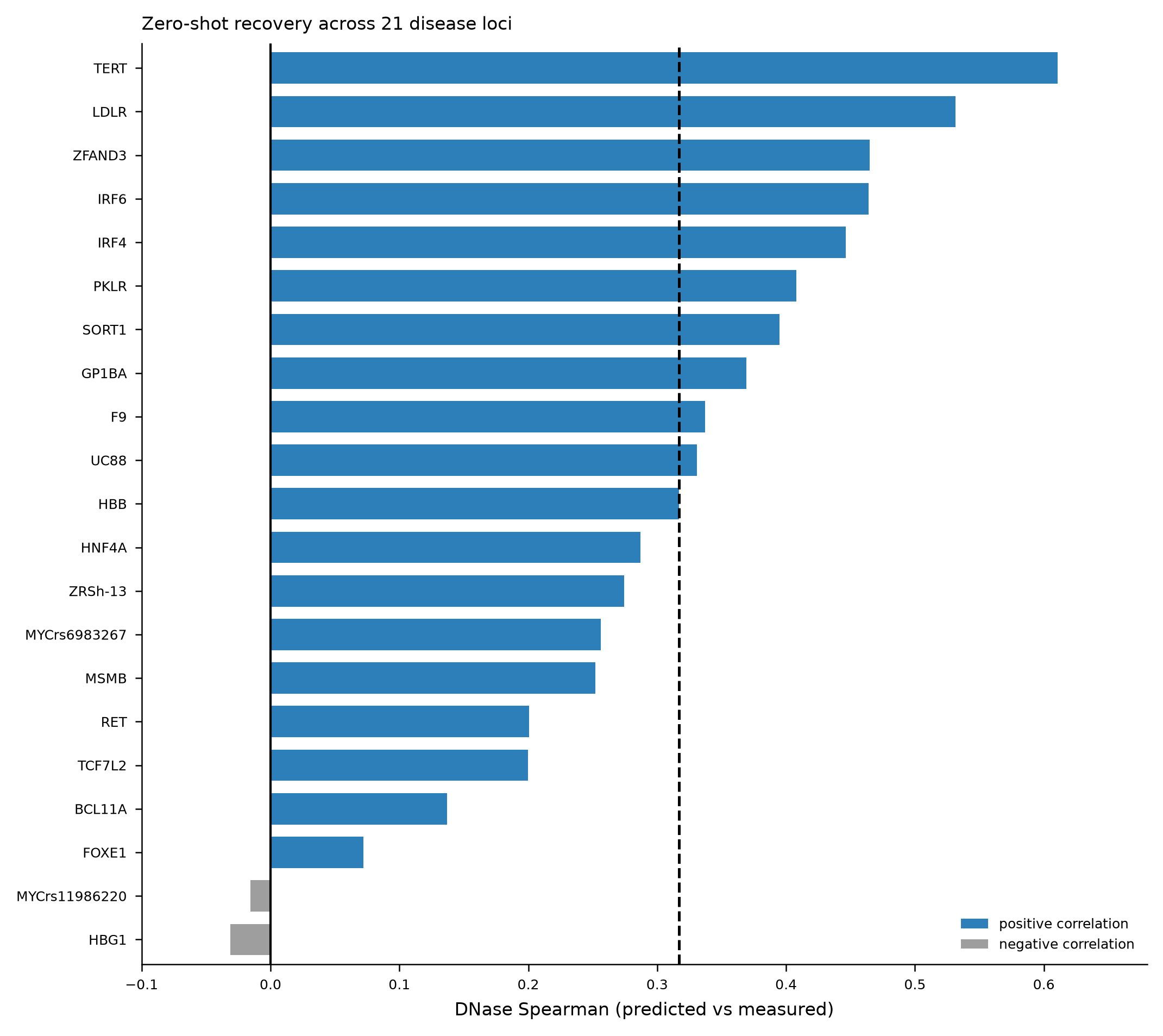
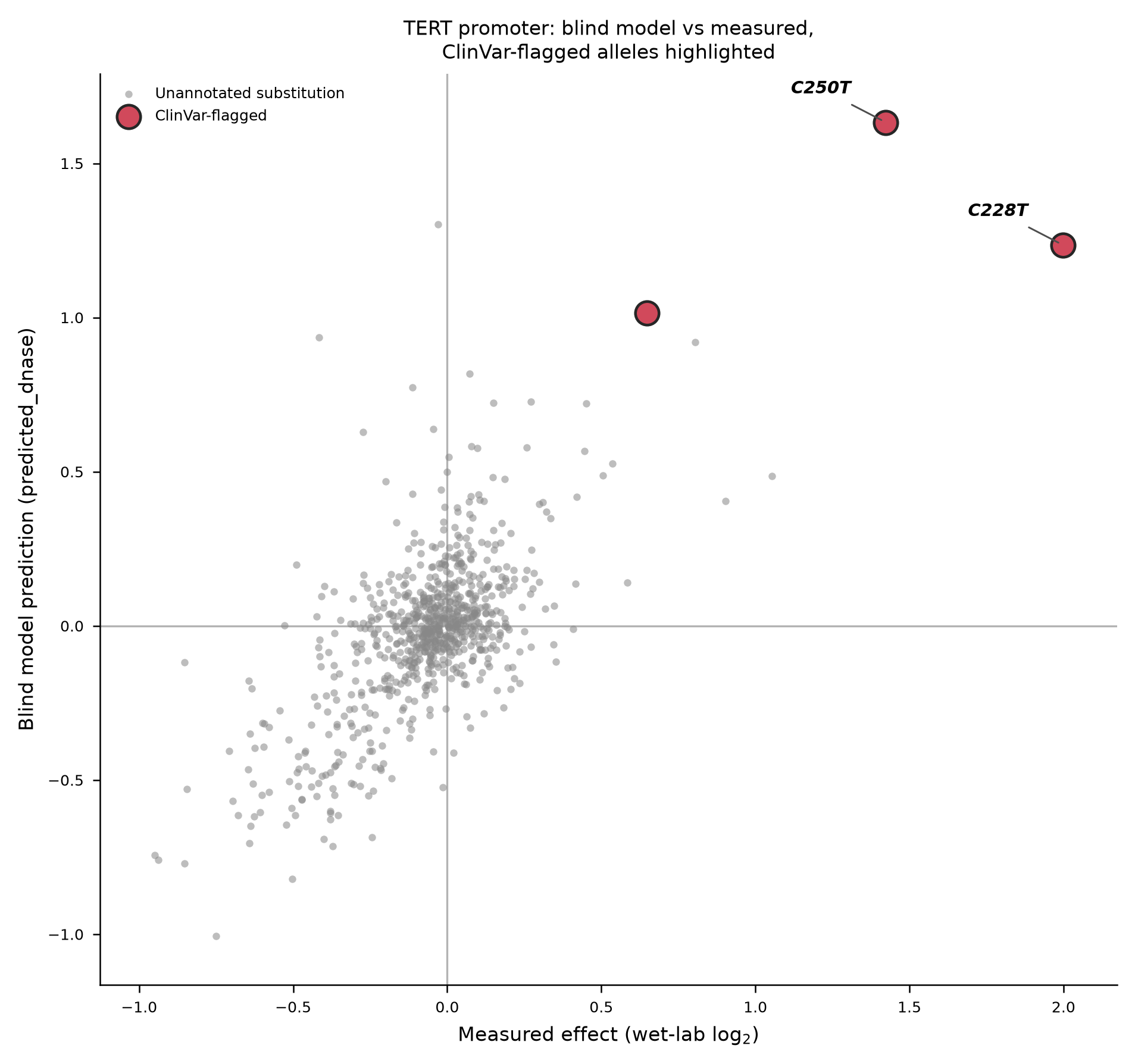
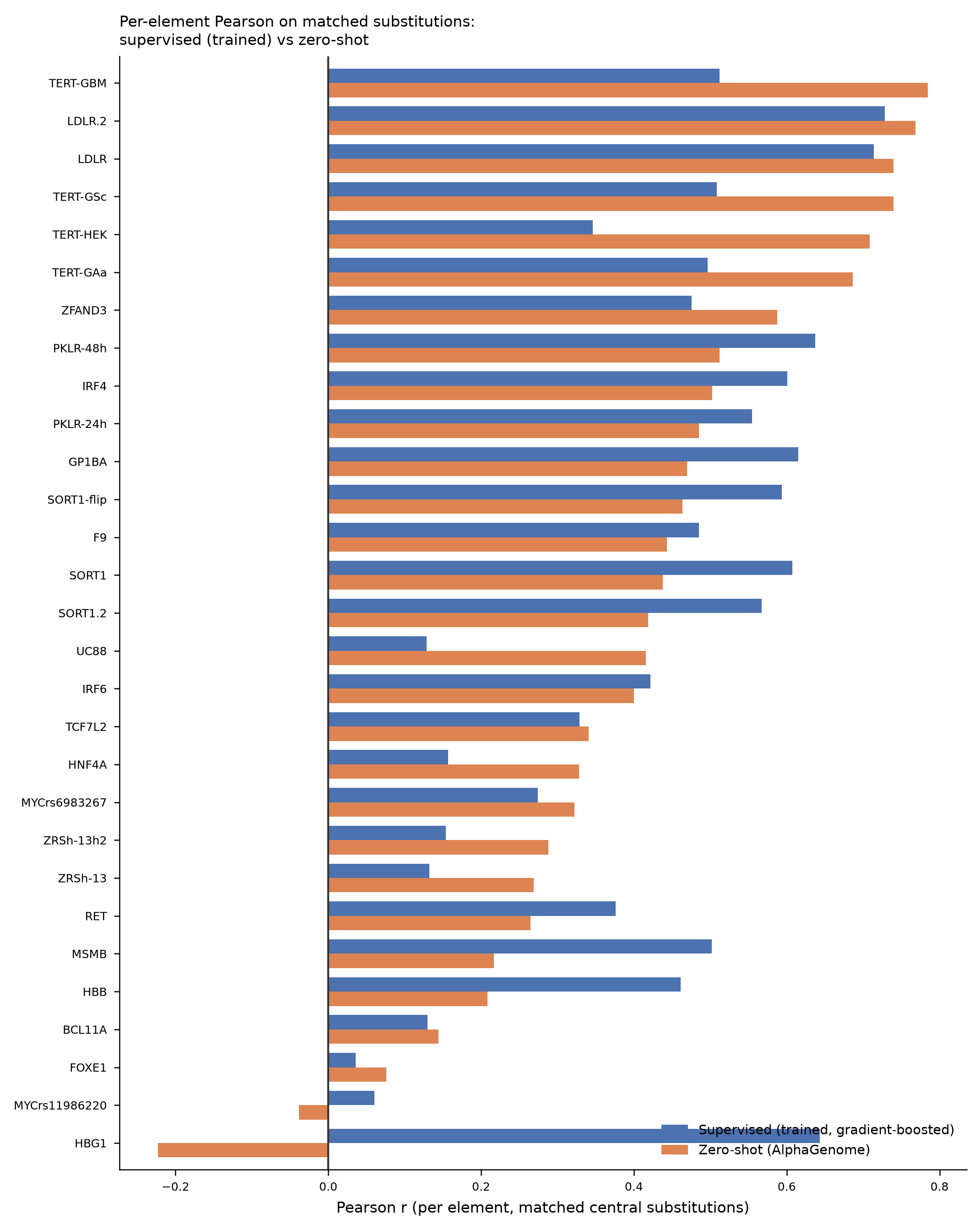
Claude Science loaded the committed result tables and redrew the report's key figures from scratch, recomputing every number as it went. All four match the report.
What it confirmed
Asked to review the frozen report as an independent expert, Claude Science re-queried ClinVar itself, checked the arithmetic, and called the work careful, unusually honest, with only polish to suggest. It confirmed the three clinical classifications, one Pathogenic and two conflicting, agreed the supervised comparison is scored on the same substitutions, and reproduced the headline numbers independently. Every round trip between the two tools is logged in the project's tooling record, the primary evidence for how Claude was used.